Skip to product information
1 of 10

Camper Jarvis

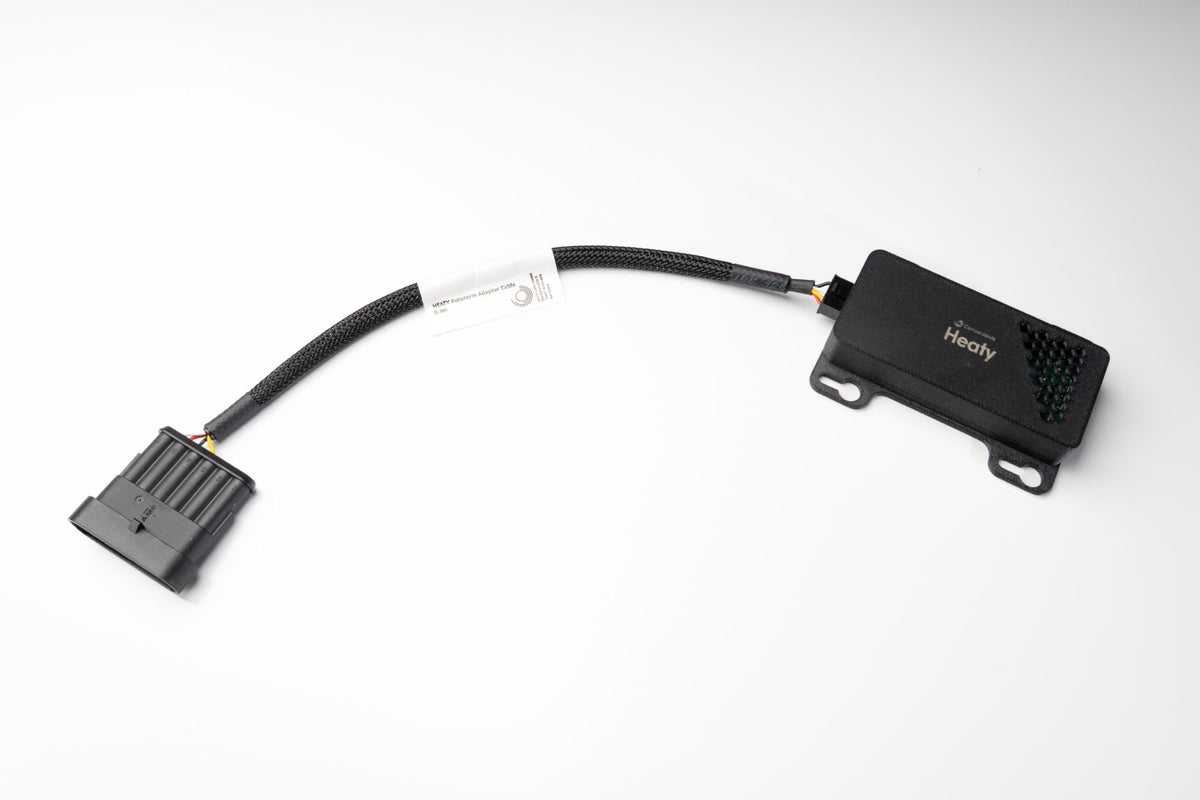
Heaty Heater Control Module

Heaty Heater Control Module

Your heater, finally on the same dial as everything else.

  • Parking heater on the SmartKnob instead of the original panel
  • Wiring harness for your heater included
  • No extra power cable, power comes from the heater (except Timberline)

Regular price $205.00 USD
Regular price Sale price $205.00 USD
Sale On request
Taxes included.
Heizung
Quantity

Requires the SmartKnob as the hub.

Request & order now

Our online shop is not open yet, but you can already order. Just send us a short message and we will get back to you quickly.

Free shipping on sets

Single modules 6.99€

Ships in 2 to 3 working days

Straight from the manufacturer

14-day right of withdrawal

Withdrawal details

Support from the manufacturer

In person from Konstanz, Germany

Heaty is the central interface to your parking heater in the Camper Jarvis system. Set target temperature, timers and operating mode from the SmartKnob or the dashboard, both equal, both in sync, entirely local in the vehicle with no cloud and no app required.

Highlights

  • Target temperature, timer and operating mode from the SmartKnob, the dashboard or a wall switch, all in sync
  • Free choice of temperature sensor, for example the SmartKnob internal sensor in the living area
  • Matching wiring harness for your heater always included
  • Powered directly from the heater, no extra supply cable needed. Exception Timberline: there Heaty needs its own 12V supply.
  • Live heater status on the SmartKnob and in the dashboard
  • Works with scenes and schedules, warm up in the morning without getting out of bed
  • Encrypted radio link to the SmartKnob, entirely local without cloud
  • Only 0.3W of its own consumption at 88x65x18mm

What Heaty can do

One place for everything

Every heater comes with its own small control panel in its own corner of the van. Heaty brings the heater to where your lighting, water and power already live: one interface for the whole vehicle, no brand-specific display, no separate app.

You choose the sensor that matters

When you create the widget you decide which temperature sensor Heaty uses, for example the SmartKnob's internal sensor in the living area rather than a probe at the heater itself. That way you heat to the temperature where you actually sit and sleep.

Plug and play, not adapter hunting

The matching wiring harness for your heater is always included. Heaty draws its power through that harness directly from the heater, so no extra supply cable is needed. Exception Timberline: there Heaty needs its own 12V supply. As soon as the heater has power, Heaty starts looking for a SmartKnob in pairing mode.

Automations are where it gets good

Link Heaty to your scenes and schedules: warm up before the alarm goes off, set back at night, or start heating automatically when a certain temperature is reached. You keep full manual control at any time.

Currently supported

  • Autoterm 2D / 4D
  • Timberline 1.0 & 2.0
  • Webasto Air Top
  • Eberspächer

Coming next

  • Truma
  • Alde
  • Wallas
  • Scheer

One Heaty per heater. If you run two independent heaters, install a second Heaty. Each one stays individually controllable and can be used separately in scenes and automations.

Find faults instead of hunting for them

Heaty has built-in self-diagnostics. They remember technical events such as voltage dips, restarts or excess temperature, even across a power cut. If something ever goes wrong, your dealer or our support sees the cause straight away instead of searching for it. That saves guesswork, back-and-forth and often a workshop visit. The self-diagnostics know how the device is doing, not what you are doing: they hold no personal data at all.

More in our knowledge base

Step by step, in German: Standheizung im Camper smart steuern, plus the guides for Autoterm, Timberline and Webasto Air Top.

Product Specification

  • Supported heaters: Autoterm 2D/4D, Timberline 1.0 and 2.0, Webasto Air Top, Eberspächer
  • Coming next: Truma, Alde, Wallas, Scheer
  • Wiring harness: matching your heater (selected when ordering)
  • Heaters per module: 1
  • Power supply: through the wiring harness directly from the heater. Exception Timberline: there Heaty needs its own 12V supply.
  • Input voltage: 9-36V (12V and 24V)
  • Own consumption: 0.3W
  • Temperature sensor: freely selectable when creating the widget
  • Operation: SmartKnob, dashboard, wall switch
  • Connectivity: encrypted radio link to the SmartKnob, local in the vehicle, no cloud
  • Dimensions: 88x65x18mm

What's in the box?

  • 1× Heaty
  • 1× wiring harness matching the selected heater
  • 4× mounting screws

Firmware & updates New

Current version: 0.4.7 from 2026-10-02

Download firmware (Heaty 0.4.7, 1.3MB)

What is new

  • Autoterm: the heater no longer switches to power mode by itself, for example after a power cut. If you choose power mode on purpose, it stays that way
  • Timberline 2.0: switch your floor heating on and off with its own target temperature
  • Timberline: a heating zone can now follow the temperature sensor of your SmartKnob
  • "All off" now also switches off the floor heating
  • Update page: if you pick the file of another device by mistake, you now get a clear message

No internet in the van? Download the file beforehand and install it in the dashboard under Connections, Modules. How the update works

All versions and changes

View full details

Heaty at a glance

Real install Heaty sits right at the heater, here a Timberline.
Heaty sits right at the heater, here a Timberline.

Heater on the SmartKnob

Target temperature, timer and mode on the SmartKnob or in the dashboard instead of the original panel.

The right sensor

You choose where it measures, for example in the living area instead of at the heater.

Wiring harness included

The matching harness for your heater is always in the box. Plug in, done.

No extra power cable

Heaty takes its power straight from the heater. Exception Timberline: there Heaty needs its own 12V supply.

Wake up warm

Warm up before the alarm and set back at night, all automated.

Many heaters

Autoterm 2D/4D, Timberline, Webasto Air Top and Eberspächer. Truma, Alde, Wallas and Scheer will follow.

Frequently asked questions about Heaty

Which heaters can I control with Heaty?

Heaty controls your existing parking heater directly, currently the Autoterm 2D and 4D, Timberline 1.0 and 2.0, the Webasto Air Top Evo 40 and the Eberspächer Airtronic S2 and S3. Heaty connects directly to the heater with the matching wiring harness, which is included. We are working on more Eberspächer and Webasto models as well as Truma, Alde, Wallas and Scheer. The current status is in the heater compatibility list.

Instead of fiddling with your heater's small original control panel, you simply set temperature, timer and operating mode on the SmartKnob or in the dashboard. One control for everything in the van, without a brand-specific display or app.

Do I need a SmartKnob for Heaty to work?

Yes. Heaty is a module and connects to the SmartKnob, which is the hub of the system. Without a SmartKnob there is no user interface and there are no automations. If you already have one in your vehicle, you simply pair Heaty with it.

Is one Heaty enough for my whole camper?

One Heaty controls exactly one heater. If you have two separate parking heaters in your vehicle, each gets its own Heaty. In return, each one stays individually and cleanly controllable via the SmartKnob and fits perfectly into scenes and automations.

What is included with Heaty?

Everything you need to connect it: the Heaty module, the wiring harness for exactly the heater you select when ordering, and four mounting screws. Because the cable already fits your heater, installation is genuinely plug-and-play: no tinkering, no hunting for adapters.

Does Heaty need a separate power supply?

Usually not. The supplied wiring harness is designed so that Heaty gets its power directly from the heater. That saves you extra cables and valuable build time.

The exception is the Timberline: there, Heaty needs its own additional 12V supply.

Just plug it in: as soon as Heaty is supplied with power, it actively starts looking for a SmartKnob in pairing mode.

Does Heaty work on 12V and 24V?

Yes. Heaty works in the range from 9 to 36V, so it fits both 12V and 24V systems. It takes its power directly from the heater via the supplied wiring harness anyway.

How much power does Heaty itself use?

0.3W in operation. For a module measuring 88x65x18mm, that makes no noticeable difference to the vehicle's total consumption, even over several days parked up.

What can I set with Heaty?

Everything you would otherwise do on your heater's control panel, only more conveniently. You set the target temperature, choose timer and operating mode and see the current status in real time, directly on the SmartKnob or in the dashboard.

The real benefit comes with automations: Heaty can be linked to your scenes and schedules, so that the heater, for example, warms up the van in the morning before you get up.

Which temperature sensor does Heaty use for control?

You decide. When you create the widget, you choose which temperature sensor is used, for example the SmartKnob's internal sensor in the living area instead of a sensor on the heater. That way the temperature is based on where you actually spend your time.

How do I heat only hot water with the Timberline?

Activate the heater with the toggle button at the top and set Heating and Ventilation at the bottom to OFF. The Timberline then heats only the water.

When will more Eberspächer devices, Truma and Alde be supported?

The Eberspächer Airtronic S2 and S3 already work. We are currently working on the other Eberspächer heaters, the Eberspächer Breezonic air conditioner, Truma and Alde. We do not give fixed dates, but you will always find the current status in the heater compatibility list.

My heater is not on the list. Can I still connect it?

Write to us with the manufacturer, the exact model from the rating plate and the control panel installed, and we will check whether and how it can be integrated. Please do not simply switch a heater through its power supply: after switching off it needs an afterrun to cool the burner.

More questions? All answers in the knowledge centre or write to us.